

The Real Cost of Keeping PowerBuilder in 2026
Table of contents

Introduction
Consider a mid-size financial services company running a PowerBuilder application built in 2009. The Appeon license fee sits in the IT budget.
What doesn’t show up as a single line item: the $100-to-$200-per-hour contractor invoices, the delayed integrations, the failed compliance audits, and the engineering hours spent patching a system that hasn’t changed architecturally in 17 years. Add those up and the license typically represents less than 10% of total annual spend.
If your organization still runs PowerBuilder, your true cost of ownership is almost certainly higher than the number on your budget sheet.
5 Hidden Costs That Inflate Your PowerBuilder TCO
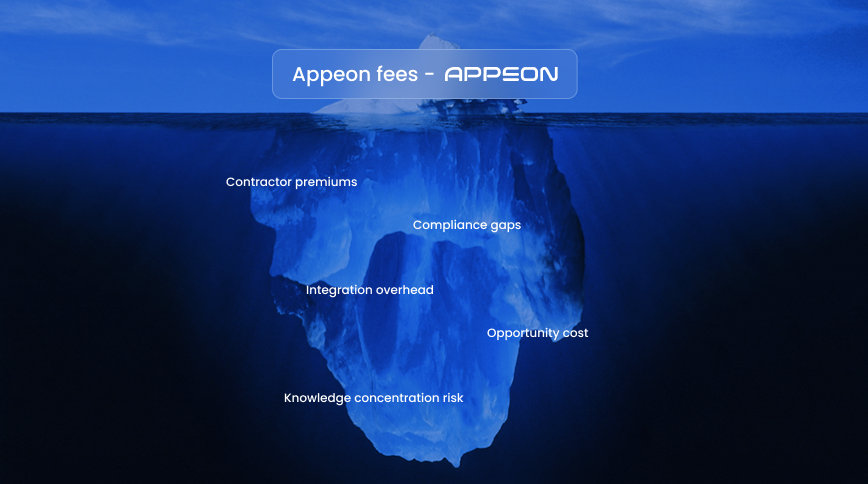
1. Specialist developer premiums keep climbing
PowerBuilder’s golden era ended in the early 2000s. The developers who built those systems are now in their late 45s and 60s. Contract rates for PB specialists sit between $150 and $280 per hour, according to 2026 market data published by GAPVelocity AI, with lead times stretching to 4 to 8 weeks for qualified candidates. Compare that to $90 to $150 per hour for experienced .NET or Java engineers with immediate availability.
2. Compliance exposure is widening
PowerBuilder 2019 and 2019 R2 lost support in 2023. PB 2017 R3 reached end of life in July 2025. PB 2019 R3 (the long-term support release) hits end of mainstream maintenance by June 30, 2026, which means no more patches or bug fixes from Appeon after that date. If your application touches healthcare data, note that a final HIPAA rule is expected around May 2026, with enforcement deadlines landing in late 2026 or early 2027. Running unsupported software into a tightening compliance window is a measurable risk, not a theoretical one.
3. Every integration costs more than it should
PowerBuilder applications were designed for desktop deployment. Connecting them to modern APIs, cloud services, or mobile interfaces requires custom middleware, workarounds, and ongoing maintenance of those workarounds. An API integration that takes a week on a modern stack can stretch to six weeks when the source system is a PB application with undocumented DataWindow logic.
4. Opportunity costs compounds quietly
Engineering hours locked into maintaining a legacy system are hours not spent building features that generate revenue. According to Software Modernization Services research across 85 enterprise modernization projects, organizations running legacy applications spend up to 80% of their IT budgets on maintenance alone. That ratio leaves almost nothing for new product development, automation, or competitive response.
5. Knowledge concentration risk is accelerating
When two or three senior developers hold all the institutional knowledge of a PowerBuilder codebase, every retirement or resignation becomes a business continuity event. Or even worse, business knowledge lives in a black box system. Organizations routinely discover they cannot modify core business logic after the one person who understood the DataWindow inheritance chain leaves.
3 Modernization Paths, Compared Honestly
Not every PowerBuilder application warrants the same approach. Here is how the options stack up in 2026.
In-place upgrade (PowerBuilder 2025 with PowerServer):
The lowest upfront cost. Appeon’s PowerServer lets you web-enable existing PB apps using a REST API middle tier with minimal code changes. Good for buying time, but the ceiling is low. You remain tied to the PowerBuilder ecosystem, the same shrinking talent pool, and the same architectural constraints.
Full rewrite in a modern stack:
Maximum control over architecture, technology choices, and long-term flexibility. Also maximum risk. Data from Software Modernization Services across 85 enterprise implementations shows that 80% of greenfield rewrites fail or exceed their budget by 300% or more. Average cost: $2.1M to $8M. Timeline: 18 to 36 months. For applications with 20 years of accumulated business logic, the rewrite path demands an appetite for significant financial and operational risk.
AI-accelerated code conversion:
This middle path uses specialized AI tooling to translate PowerBuilder code (including DataWindows) into modern stacks like .NET, React, Java, or Angular. Timelines are 1 to 12 months (depending on the codebase size). The AI handles 70% to 95% of the conversion work, depending on application complexity. The remaining percentage requires human engineers to validate business logic, handle edge cases, and ensure the converted application meets performance and security standards.
The tradeoff is real: AI-accelerated conversion delivers up to 60% to 75% cost savings versus a full rewrite, but it requires a partner with both the AI tooling and the engineering depth to catch what automation misses.
Which PowerBuilder Versions Face the Most Pressure Right Now?
PB 2017 R3 reached end of life in July 2025. PB 2019 and 2019 R2 have been out of support since 2023. PB 2019 R3 (LTS) reaches end of mainstream maintenance by June 30, 2026, with full end of life following approximately in 2028.
PB 2022 R3 remains in active LTS support today, but organizations running it still face identical talent, integration, and opportunity cost pressures.
Waiting another 12 months does not reduce cost. It increases it. Developer rates rise as the talent pool shrinks further. Compliance deadlines arrive whether or not your migration is ready.
How AI Changes the Modernization Math
AI-accelerated migration works by parsing PowerBuilder source code, extracting business logic, converting DataWindows into modern UI components, and generating equivalent code in the target stack. The best implementations pair deterministic code conversion (where the output is predictable and testable) with generative AI for analysis, documentation, and test generation.
The distinction that matters: AI-only tools without engineering oversight produce fragile outputs. Automated conversion rates of 95% sound impressive until the remaining 5% contains your most complex business rules, the ones that took a decade to get right.
OLSYS approaches this with what we call an AI-led, engineer-owned process, and our AI-led spec-driven development methodology constrains AI output with detailed specifications. That discipline eliminates the hallucination and logic drift common in unstructured code generation.
Before You Sign Anything: A 5-Point Assessment Checklist
Use this before engaging any modernization partner:
- Confirm your PowerBuilder version and check its Appeon support status. If you are on PB 2019 R3 or earlier, your maintenance window is closing.
- Calculate your true annual maintenance spend. Add developer costs (salary plus contractors), infrastructure overhead, integration maintenance, and the dollar value of engineering hours diverted from new development.
- Map your business logic documentation gaps. If critical rules exist only in code or in one developer’s memory, that is your highest-priority risk.
- Identify compliance deadlines that create a hard timeline. HIPAA, SOC 2, PCI DSS requirements do not wait for your migration plan.
- Get a fixed-scope assessment from a modernization partner that includes application size classification, a confirmed delivery timeline, and a conversion measurement methodology.
Ready to find out what your PowerBuilder system actually costs?
Schedule a PowerBuilder Assessment with Olsys. Within 2 to 3 business days, you will receive your application size classification, delivery timeline, and proposed conversion approach.